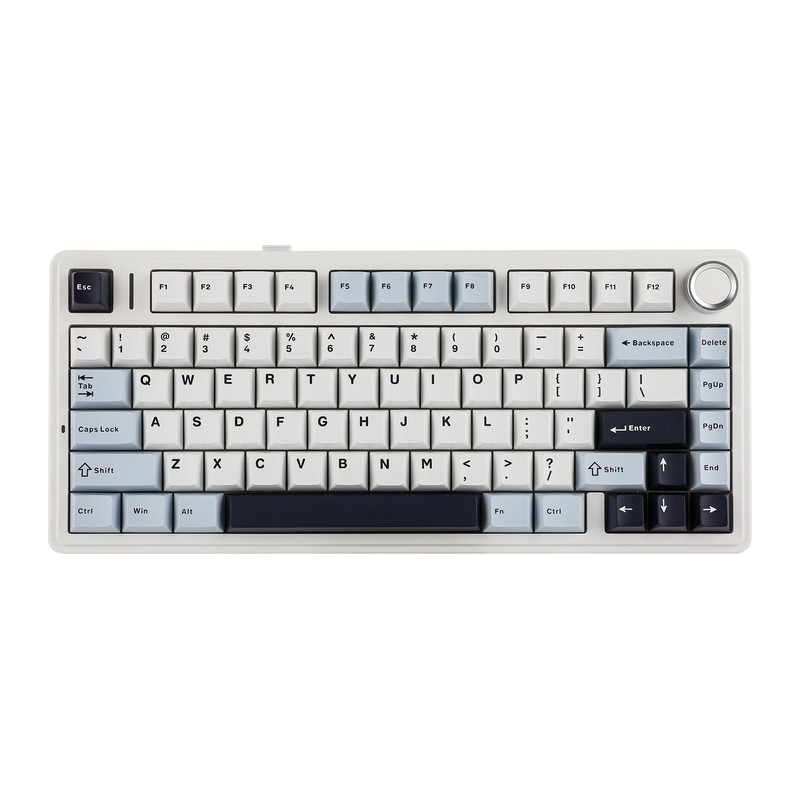
AULA F75 review: the $65 board that made 'creamy' a category standard
A 75% gasket-mounted wireless mechanical keyboard with pre-lubed hot-swappable switches, tri-mode connectivity, and a sound profile that upended what a $65 keyboard is supposed to feel like — the budget breakout of the past two years.
- aula f75
- Royal Kludge RK84
- Womier SK80
- Epomaker TH80
Updated 2026-07-18. Interest is relative search demand (0–100), not sales figures.
AULA F75 wireless mechanical keyboard specs
| Layout | 75%, 81 keys, volume knob |
|---|---|
| Switches | Pre-lubed linear, hot-swappable |
| Mount | Gasket, with foam dampening |
| Connection | Bluetooth 5.0, 2.4 GHz dongle, or USB-C |
| Keycaps | PBT |
| Lighting | Per-key RGB |
Manufacturer's published specifications.
Verdict: the AULA F75 is why “just get the Aula” became a reflex answer in budget-keyboard threads. Gasket mount, pre-lubed switches, hot-swap sockets, a knob, and tri-mode wireless were enthusiast-tier features — this board put all of them at an impulse-buy price, and the search interest hasn’t stopped climbing since.
The specs that matter
Per the official listing:
- 75% layout with a knob: 81 keys keep arrows and F-row while cutting the numpad; a volume knob sits top-right.
- Gasket mount + dampening: the plate sits on gaskets with layers of foam, giving the soft bounce and rounded “thock” the board is famous for.
- Pre-lubed, hot-swappable switches: factory-lubed linear switches in a hot-swap PCB — swap switches without soldering.
- Tri-mode connectivity: Bluetooth 5.0, 2.4GHz dongle, or USB-C wired.
- PBT keycaps + per-key RGB and a large battery for wireless use.
What reviewers love
- The sound and feel per dollar. The most consistent line across written and video reviews: it types and sounds like boards costing two to three times more. The stock tuning — not one standout part — is the trick.
- Enthusiast features without the project. Hot-swap, gaskets, and pre-lubed switches used to mean building a keyboard; here they come in the box, working.
- It made the whole segment better. Reviewers routinely benchmark other budget boards against the F75, which is about the strongest compliment a $65 product can earn.
Worth knowing before you buy
- The software is the weak spot. The driver/web configurator is clunky and limited, and macOS support is thin — reviewers agree the board is best enjoyed as it comes.
- Wireless is serviceable, not flawless. Some long-term reviews note Bluetooth hiccups at fast typing speeds; the 2.4GHz dongle or cable is the safe mode for gaming.
- Variants are a maze. F75, F75 Pro, EPOMAKER x AULA F75, and F75 MAX all coexist with different switches and extras. This pick is the standard F75; the linked listing pins the exact variant.
Who it’s for
Anyone’s first mechanical keyboard, and anyone curious what the “creamy keyboard” fuss is about without spending flagship money — typists and gamers alike, as long as deep software customization isn’t the priority.