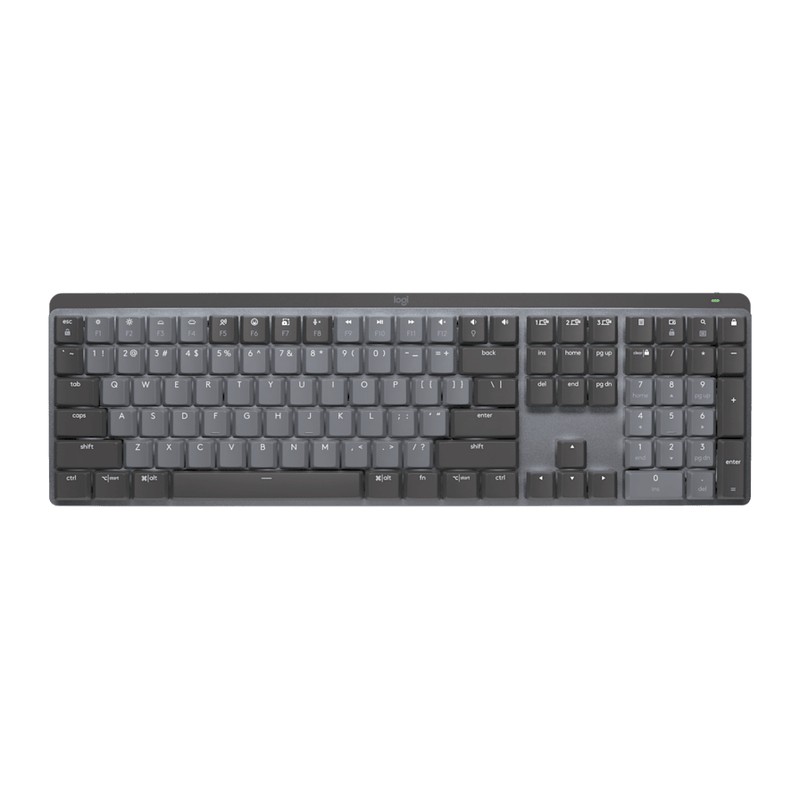
Logitech MX Mechanical review: mechanical switches, office manners
Logitech's productivity take on the mechanical keyboard: low-profile Tactile Quiet switches, smart backlighting that wakes as your hands approach, Easy-Switch across three devices, and USB-C charging in a full-size aluminum-topped board.
- MX Mechanical
- Logitech MX Keys S
- Keychron K2
Updated 2026-07-17. Interest is relative search demand (0–100), not sales figures.
Logitech MX Mechanical wireless illuminated keyboard specs
| Battery | Up to 15 days with backlight, 10 months without |
|---|---|
| Switches | Low-profile mechanical, Tactile Quiet (brown) |
| Backlight | Smart white, proximity and ambient sensors, 6 patterns |
| Multi-device | 3 devices (Easy-Switch), Bluetooth LE or Logi Bolt |
| Layout | Full-size with numpad, low-profile aluminum top case |
| OS support | macOS, Windows, Linux, iOS, Android |
Manufacturer's published specifications.
Verdict: the mechanical keyboard for people who type for a living rather than tinker for a hobby. You give up hot-swap sockets and RGB theatrics; you get real tactile switches in a slim board that pairs to three machines and doesn’t announce itself to the whole office.
The specs that matter
Per Logitech’s official listing:
- Switches: low-profile mechanical, offered in three types — this pick is the Tactile Quiet (brown) variant, Logitech’s quietest mechanical feel.
- Smart backlighting: proximity and ambient-light sensors wake the white backlight as your hands approach and adjust it to the room; six lighting patterns.
- Multi-device: Easy-Switch keys pair three devices (Bluetooth Low Energy or the Logi Bolt receiver) across macOS, Windows, Linux, iOS, Android — keycaps are dual-labeled for Mac/Win.
- Battery: USB-C rechargeable — up to 15 days with backlight, up to 10 months with it off.
- Build: full-size layout with numpad under a low-profile aluminum top case.
What is the MX Mechanical’s backlight like?
White, and only white. Logitech’s spec sheet lists it as “white backlighting” — no RGB, which is the first thing to know if you’re arriving from a gaming board. The interesting part isn’t the colour, it’s that the keyboard decides when to use it: the keys light as your hands approach, and an ambient-light sensor sets the level to suit the room, so most of the time it sits idle rather than burning. There’s one LED per key, so effects treat each key independently instead of lighting the board in zones.
The catch, in Logitech’s own words. The backlight doesn’t reach the whole keycap — “mechanical keyboards have the switch mechanism located in the middle of the keycap and the LED is at the top. This prevents backlighting from illuminating the entire keycap.” Secondary characters on a key can sit in shadow. That’s the switch design rather than a fault in your unit, and it’s worth knowing before it surprises you.
It is also the single biggest thing you spend battery on. Logitech rates the board at 15 days with the backlight on against 10 months with it off — the lighting costs roughly twenty times the runtime. Switching it off is what turns a weekly-charge keyboard into a twice-a-year one.
For what it’s worth against the other backlit boards on this site:
- Aula F75 — per-key RGB
- SteelSeries Apex 3 — 10-zone RGB
- Logitech G213 — LIGHTSYNC RGB, 5 zones
- Logitech G413 SE — white LED, no RGB
- MX Mechanical — white, sensor-driven
The gaming boards hand you colour and leave the control to you. The MX Mechanical gives you one colour and takes the control away — it lights when you arrive and dims to the room unasked. That’s the trade, and it’s deliberate for a board meant to disappear into an office desk.
What reviewers love
- The typing feel threads the needle: reviews consistently describe it as the middle ground between the mushy quiet of the MX Keys and a full-height mechanical — tactile, fast, and office-acceptable.
- The multi-device flow is the same Easy-Switch system praised on the MX mice — one board for the work laptop, personal machine, and tablet.
- Battery life with the backlight off turns a weekly-charge keyboard into a twice-a-year one.
Worth knowing before you buy
- It’s not an enthusiast board: switches aren’t hot-swappable, keycaps are low-profile-specific, and the lighting is white-only.
- Backlight drains the battery fast — the 15-day figure assumes you use it; heavy lighting users will charge more often.
- Low-profile isn’t for everyone: if you want deep, full-height key travel, this intentionally isn’t that.
- A Mini version exists (same switches, no numpad) if desk space matters more than the number pad.
Who it’s for
Typists who want mechanical feedback without building a hobby around it — multi-device workers, open-office inhabitants, and MX Master owners who want the keyboard half of the ecosystem.