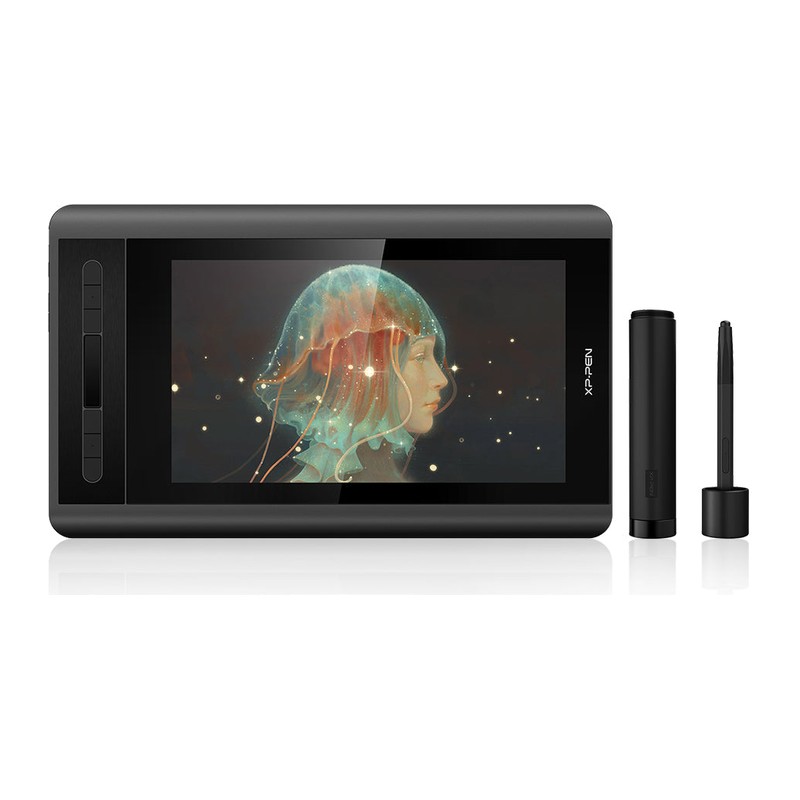
XP-PEN Artist 12 review: the small pen display that stuck around
An 11.6-inch 1080p pen display with a battery-free 8,192-level stylus, six shortcut keys and a touch bar, driven over USB-C. Launched in 2018 and still selling — the entry point for artists who want a screen under the pen without a desk-sized purchase.
- xp pen artist 12
- HUION Kamvas 13
- HUION Kamvas Pro 16
- Wacom Cintiq 16
Updated 2026-08-07. Interest is relative search demand (0–100), not sales figures.
XP-PEN Artist 12 11.6-inch FHD pen display specs
| Screen | 11.6-inch IPS, 1920 × 1080 (16:9) |
|---|---|
| Display area | 256 × 144 mm |
| Pressure levels | 8,192, battery-free stylus |
| Pen resolution | 5,080 LPI |
| Report rate | max 266 RPS |
| Colour gamut | 72% NTSC |
| Contrast | 700:1 |
| Response time | 14 ms |
| Viewing angle | 178° |
| Controls | 6 shortcut keys + 1 touch bar |
| Dimensions | 364.11 × 218.87 mm |
| Connection | USB-C, 150 cm A-to-C cable, 10 W |
| Compatibility | Windows 10/8/7, macOS 10.10 and later |
Manufacturer's published specifications.
More photos
Verdict: the Artist 12 is the compact end of the pen-display market and has held that spot for years by being the cheapest screen most people find genuinely usable. The drawing side is solid — good nib feel, a real pressure curve editor in the driver, six tactile keys — and the compromises are all in colour and cabling rather than in the pen. Treat it as a drawing surface for line and illustration work, not a colour-critical monitor.
This is an editorial summary built from XPPen’s published specifications and third-party reviews, not a hands-on test.
The specs that matter
Per XPPen’s official specifications:
- 11.6-inch IPS at 1920 × 1080, with a 256 × 144 mm display area and a 178° viewing angle.
- Battery-free stylus with 8,192 pressure levels, 5,080 LPI resolution and a max 266 RPS report rate.
- 72% NTSC colour gamut, 700:1 contrast, 14 ms response.
- Six shortcut keys plus one touch bar down the left edge.
- 364.11 × 218.87 mm body, connected over USB-C with a 150 cm A-to-C cable; 10 W draw.
- Windows 10/8/7 and macOS 10.10 or later.
What reviewers love
- Nib feel close to the reference. Reviewers repeatedly note the pen and nibs feel closer to Wacom’s than most alternatives at the price, which is where cheap pen displays usually give themselves away.
- A driver with a real pressure curve. Per-application profiles and a custom pressure curve are features normally reserved for pro-tier tablets.
- Keys you can find by feel. The six physical buttons are tactile and anti-ghosting; the touch bar is a bonus rather than the main control.
- What’s in the box. The bundle has historically included a pen holder with spare nibs and a drawing glove — the accessories people otherwise buy in week two.
Worth knowing before you buy
- Colour is the compromise. 72% NTSC measured out around 87% sRGB in independent testing — fine for sketching and lineart, short of what colour-critical work wants.
- The eraser end is unreliable. Reviewers describe the eraser tip’s pressure response as erratic enough to ignore, and the single pen button sits flush enough to be hard to find without looking.
- No stand included. Drawing flat on a desk for hours is a neck problem; budget for a stand.
- Mind the USB-C port. The port isn’t heavily reinforced, so treat the cable gently — reviewers flagged strain as the likeliest long-term failure.
- It’s a 2018 design. Newer Artist 12 generations exist with laminated glass and wider gamuts; this is the original, and it is priced accordingly.
Who it’s for
Someone who wants their hand and their cursor in the same place, on the smallest screen that still feels like drawing, and who works mostly in line, sketch and comic workflows where colour accuracy isn’t the deciding factor. It’s also the pragmatic second device for an artist who already has a big display and wants something to draw on beside a laptop.